Use BCF issues in 2D plan view
Use BCF issues in 2D plan view when you need to review and share issues directly on floor plans, sections, or other plan-based views.
This workflow helps you capture a 2D issue context, add annotations, export the issue as BCF, and reopen it later with the same saved view.
Note
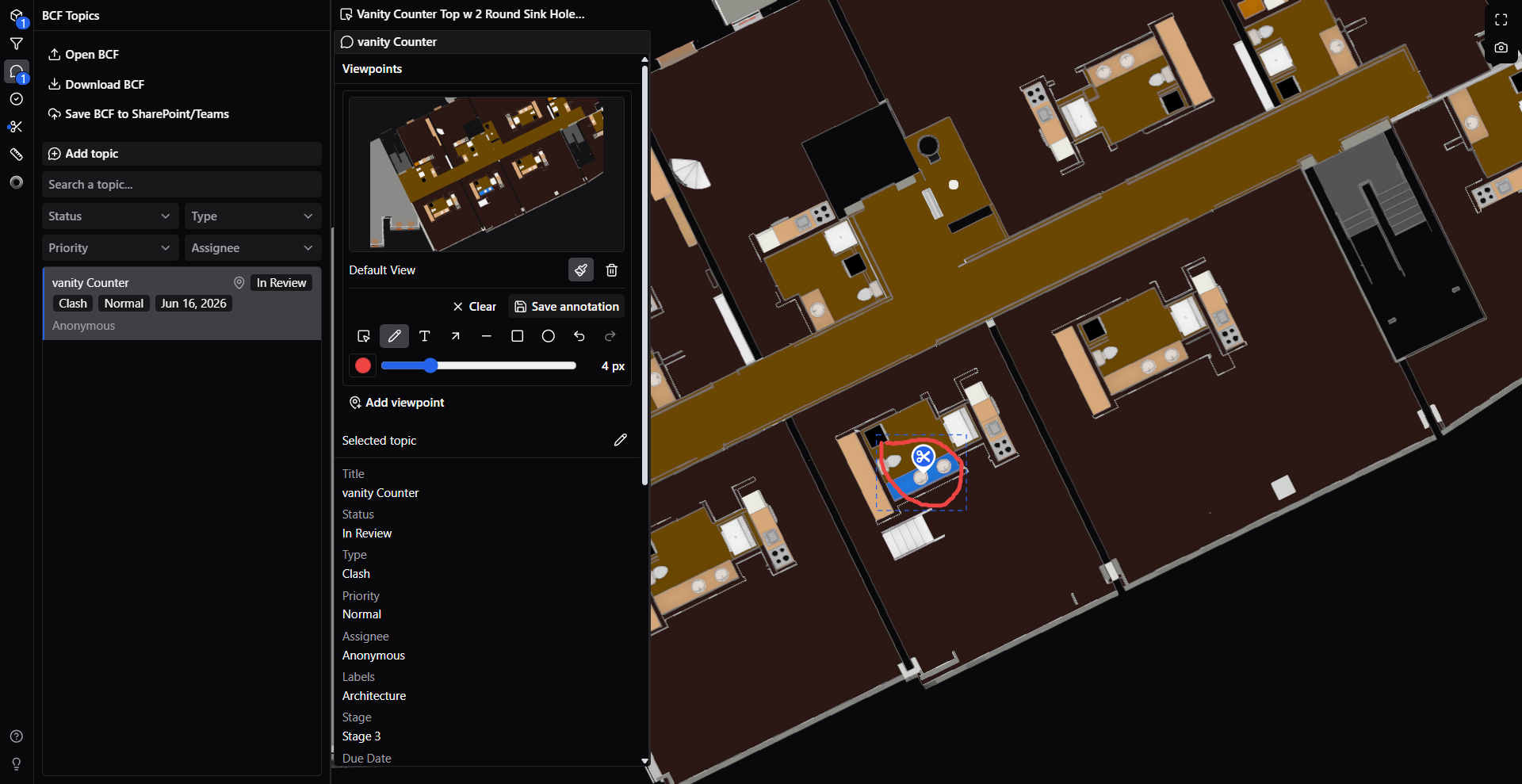
A 2D BCF issue can preserve the issue context from the current plan view, including the saved viewpoint, camera state, snapshot, selected elements, and annotations used to explain the issue.
What you can do with BCF in 2D
Use BCF in 2D plan view to:
- Create issues directly from a 2D plan-based review.
- Add annotations that explain the issue clearly on the saved view.
- Export the issue as a
.bcfor.bcfzipfile for coordination with other tools. - Import BCF files back into the viewer and restore the saved issue context.
- Reopen the issue later and retrieve the saved plan view, camera position, and related issue data.
Create and export a 2D BCF issue
Create a BCF issue from the current 2D plan view when you want to keep the exact review context for later use.
- Open the IFC model and switch to the relevant 2D plan view.
- Navigate to the area that needs review.
- Add a BCF topic from the current view.
- Add the issue title, description, status, or other topic details.
- Add annotations if you want to point to a location, describe a correction, or mark up the view.
- Save the topic.
- Select Export BCF or Download to export the topic as a BCF file.
The exported BCF file can then be shared with other reviewers or loaded into another BCF-compatible workflow.
Import and reopen a 2D BCF issue
Import a BCF file when you want to continue working on a previously saved 2D issue.
- Open the IFC model in the viewer.
- Open the BCF Topics panel.
- Select Import.
- Choose the
.bcfor.bcfzipfile. - Open the imported topic from the topics list.
When you open the topic, the viewer restores the saved issue context so you can continue the review from the same plan-based viewpoint.
What is restored when you reopen the issue
Depending on the topic data, reopening a 2D BCF issue can restore:
- The saved plan-based viewpoint.
- The camera position and orientation used when the topic was created.
- The snapshot saved with the topic.
- Selected or isolated model elements related to the issue.
- Issue annotations used to explain the review comment.
This makes BCF useful for review cycles where the same issue must be checked, updated, and retrieved again later.
Common use cases
BCF 2D issue workflows are useful when you need to:
- Coordinate issues on floor plans with architects, engineers, or site teams.
- Mark up a plan view and send the issue to another reviewer.
- Export a 2D issue for use in another BCF-compatible application.
- Import the issue again and continue from the same saved visual context.
- Keep camera and annotation context together with the issue record instead of relying on screenshots only.