Measure and export manual measurements
Use the measurement panel to create manual length and area measurements in the 3D model, review them in a list, remove individual measurements, and export the measurement results to Excel.
Manual measurements are viewer-created review data.
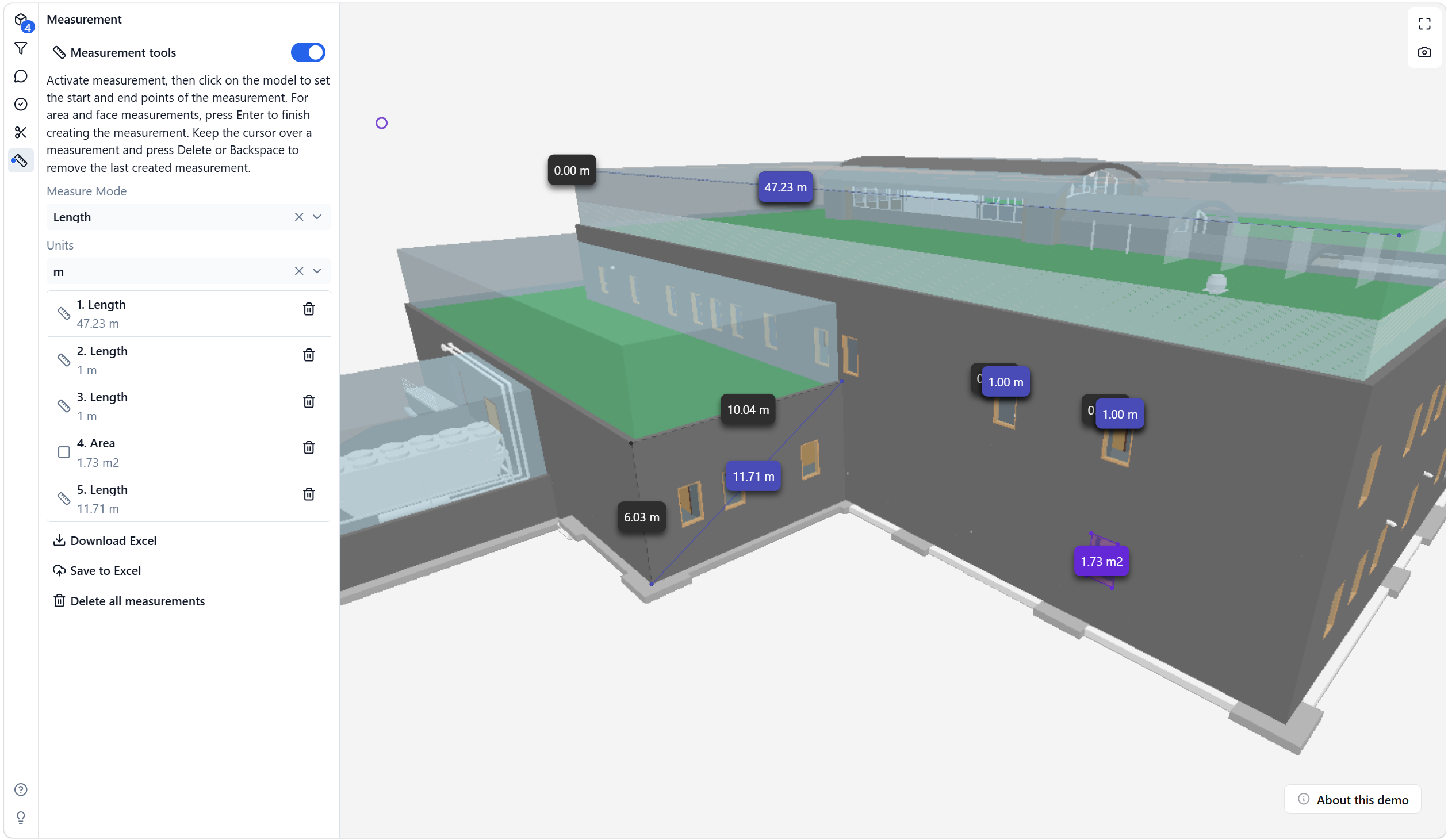
Open the measurement panel
- Open an IFC model in the viewer.
- Select the measurement tool from the toolbar.
- Turn on Measurement tools.
- Choose the measurement mode and unit.
Available measurement modes include length and area workflows. Units can be changed before or after creating measurements.
Create measurements
For length measurements, click points in the model to define the measured segment.
For area measurements, create the area boundary and press Enter to finish the area.
The measured values are shown as labels in the 3D model and as rows in the measurement panel.
Manage measurements in the list
The measurement panel lists the manual measurements in creation order.
Each row shows:
- measurement type
- measured value and unit
- a delete action for that single measurement
Use the row delete action when you want to remove one measurement without deleting all measurements or selecting it in the 3D model.
Export measurements to Excel
Use Download Excel to create a local .xlsx file with the current manual measurements.
Use Save to Excel in supported Microsoft 365 app surfaces, such as the IFC Viewer Add-in for Excel or the IFC Viewer for Microsoft Teams. For host-specific behavior, see Export manual measurements to Excel.
The measurement export includes manual measurement data such as:
- Measurement Type
- Measured Length or Measured Area
- Measurement Unit
- Base Length or Base Area
- Measured Perimeter for area measurements
- Point Count
- Model IDs used to resolve measurement points
- Start, End, Center, and Point XYZ values
- XYZ Reference
Coordinate notes
The exported XYZ values describe the measured points in the model coordinate reference used by the viewer export.
When the measured point can be resolved against loaded model geometry, the export uses IFC model XYZ values in a Z-up reference. If a point cannot be resolved to a model, the export falls back to viewer XYZ values and marks the reference accordingly.
These values are manual measurement coordinates. They are not georeferenced Easting/Northing values unless that conversion is explicitly available in the model workflow.