Add an Enterprise license key to IFC Viewer Visual for Power BI
Use this procedure if your organization has selected Enterprise in the Power BI IFC Viewer pricing and plans and received a tenant license key from Flinker. Entering your license key enables enhanced capabilities within your Power BI reports.
Get your Enterprise license key
Get the Enterprise license key from your organization's administrator. Administrators can retrieve the key from the billing portal.
Note
License keys are bound to your subscription. Contact Flinker support again if you need to move the key to another tenant or if it should be revoked.
Enter the license key in Power BI Desktop
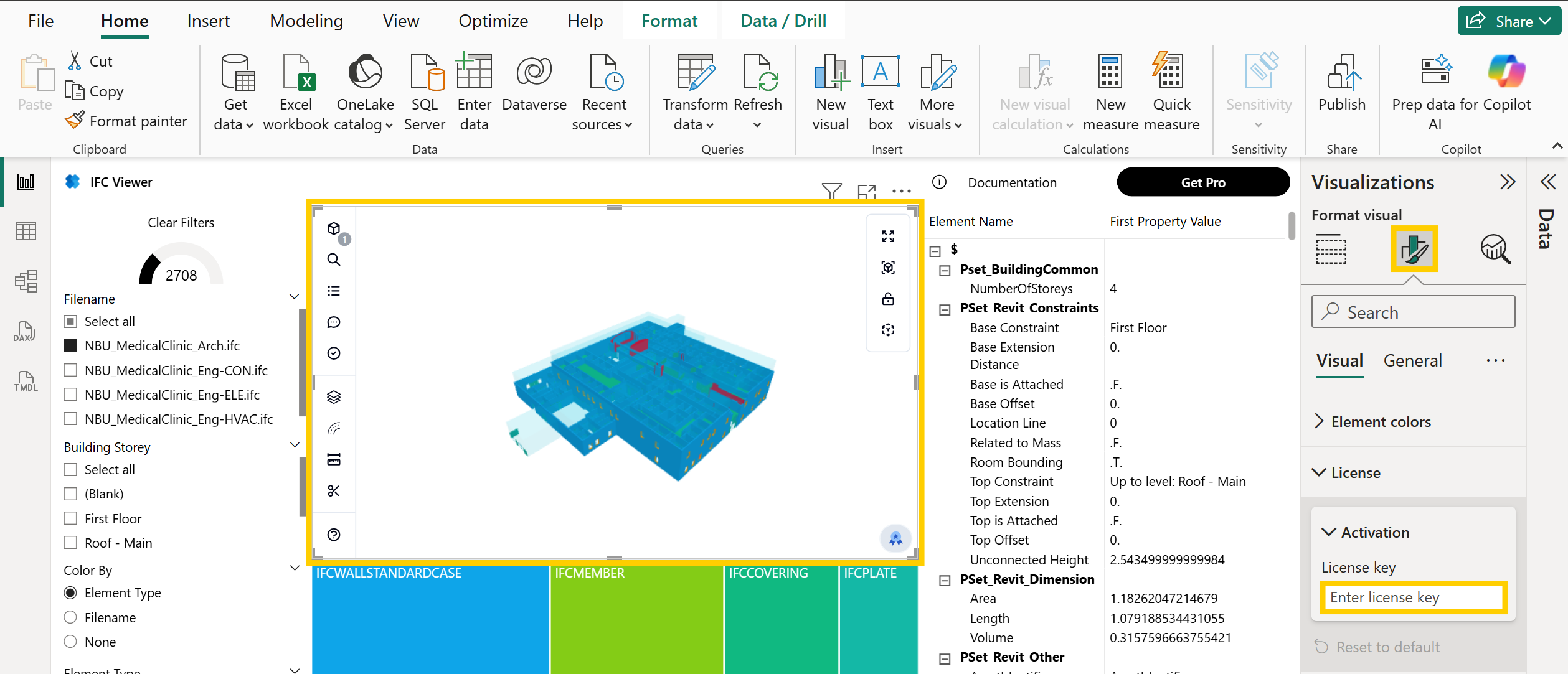
- Open the report in Power BI Desktop and select the IFC Viewer visual.
- In the Visualizations pane, switch to Format visual.
- Expand License > Activation and paste the key into License key.
- The visual reloads and activates the Enterprise tenant license.
Note
Enter the Enterprise license key for every new IFC Viewer visual that you add to a report.
Publish to the Power BI service
- Publish or update the report after entering the key. The activation travels with the report.
- If the key changes later, open the report in Desktop, update the key, and republish so that the service receives the new activation.